Showing posts with label DataControl. Show all posts

Monday, 14 April 2014

WPF DataGrid : Insert Edit Update And delete operation

Hellow Friends !!
In  This article I will Explain you How to build simple WPF application to View ,Update, Insert and Delete Data.
Here I am using Data Grid to display, edit, add and delete data from SQL server database.
The Data Grid Control similar to ASP.NET Grid control. Data Grid Control is the powerful Control to available to developer and it has various collections to bind and provides various events to work with.
For Implementing Insert,Edit,Update and Delete Operation in WPF application,
I have created One table in database.

Table name is “dsh_wpfCRUD”.


Next Step 
1.Open Visual Studio
2.Create a new Project (WPF Application) name it “WpfCRUD” (You   can Also change Project name as you need.)


Next Step
3.In this Application  create appropriate GUI using XAML code. I have taken four textbox 
Two radio button, two Combo Box, two Button and one Data Grid Control to perform Operation of view ,edit and delete data.
I do this like below code.

MainWindow.xaml
<Window x:Class="WpfCRUD.MainWindow"
        xmlns="http://schemas.microsoft.com/winfx/2006/xaml/presentation"
        xmlns:x="http://schemas.microsoft.com/winfx/2006/xaml"
        Title="MainWindow" Height="378.358" Width="550.373">
    <Grid Margin="0,0,-31,-218">
        <Grid.ColumnDefinitions>
            <ColumnDefinition Width="37*"/>
            <ColumnDefinition Width="154*"/>
        </Grid.ColumnDefinitions>
        <DataGrid x:Name="datagrid1" x:Uid="datagrid1" SelectionMode="Single"  HorizontalAlignment="Left" Margin="62,263,0,214" ItemsSource="{Binding}" AutoGenerateColumns="False" Width="475" Grid.ColumnSpan="2">
            <DataGrid.Columns>
                <DataGridTextColumn Binding="{Binding id}" Header="ID" x:Name="id" IsReadOnly="True" Width="Auto"></DataGridTextColumn>
                <DataGridTextColumn Binding="{Binding name}" Header="Name" x:Name="name" Width="Auto"></DataGridTextColumn>
                <DataGridTextColumn Binding="{Binding address}" Header="address" x:Name="address" Width="Auto"></DataGridTextColumn>
                <DataGridTextColumn Binding="{Binding gender}" Header="gender" x:Name="gender" Width="Auto"></DataGridTextColumn>
                <DataGridTextColumn Binding="{Binding country}" Header="country" x:Name="country" Width="Auto"></DataGridTextColumn>
                <DataGridTextColumn Binding="{Binding state}" Header="state" x:Name="state" Width="Auto"></DataGridTextColumn>
                <DataGridTextColumn Binding="{Binding city}" Header="city" x:Name="city" Width="Auto"></DataGridTextColumn>
                <DataGridTextColumn Binding="{Binding contactno}" Header="contactno" x:Name="contactno" Width="Auto"></DataGridTextColumn>
                <DataGridTemplateColumn Header="Edit">
                    <DataGridTemplateColumn.CellTemplate >
                        <DataTemplate>
                            <Button Content="Edit" Click="Button_Click_2" CommandParameter="{Binding id}"></Button>
                        </DataTemplate>
                    </DataGridTemplateColumn.CellTemplate>
                </DataGridTemplateColumn>
                <DataGridTemplateColumn Header="delete">
                    <DataGridTemplateColumn.CellTemplate >
                        <DataTemplate>
                            <Button Content="Delete" Click="Button_Click_3" ></Button>
                        </DataTemplate>
                    </DataGridTemplateColumn.CellTemplate>
                </DataGridTemplateColumn>
            </DataGrid.Columns>
        </DataGrid>
        <TextBox Grid.ColumnSpan="2" HorizontalAlignment="Left" Height="23" TextWrapping="Wrap" VerticalAlignment="Top" Width="120" Margin="143,34,0,0" Name="txtname"/>
        <Label Grid.ColumnSpan="2" Content="Name:" HorizontalAlignment="Left" Margin="48,34,0,0" VerticalAlignment="Top"  Target="{Binding ElementName=txtname}"/>
        <Label Grid.ColumnSpan="2" Content="Address:" HorizontalAlignment="Left" Margin="48,65,0,0" VerticalAlignment="Top"  Target="{Binding ElementName=txtaddress}"/>
        <TextBox Grid.ColumnSpan="2" HorizontalAlignment="Left" Height="23" TextWrapping="Wrap" VerticalAlignment="Top" Width="120" Margin="143,68,0,0" x:Name="txtaddress"/>
        <Label Grid.ColumnSpan="2" Content="Gender:" HorizontalAlignment="Left" Margin="48,96,0,0" VerticalAlignment="Top"  Target="{Binding ElementName=txtgender}"/>
        <Label Grid.ColumnSpan="2" Content="Country:" HorizontalAlignment="Left" Margin="52,127,0,0" VerticalAlignment="Top"  Target="{Binding ElementName=cmbcountry}" RenderTransformOrigin="0.649,1.909"/>
        <ComboBox x:Name="combobox1" Grid.ColumnSpan="2" HorizontalAlignment="Left" Margin="143,127,0,0" VerticalAlignment="Top" Width="120" SelectionChanged="ComboBox_SelectionChanged_1"/>
        <Label Grid.ColumnSpan="2" Content="State:" HorizontalAlignment="Left" Margin="52,153,0,0" VerticalAlignment="Top"  Target="{Binding ElementName=cmbstate}" RenderTransformOrigin="0.649,1.909"/>
        <ComboBox x:Name="combobox2" Grid.ColumnSpan="2" HorizontalAlignment="Left" Margin="143,153,0,0" VerticalAlignment="Top" Width="120"   />
        <Label Grid.ColumnSpan="2" Content="City:" HorizontalAlignment="Left" Margin="52,179,0,0" VerticalAlignment="Top"  Target="{Binding ElementName=txtcity}"/>
        <TextBox Grid.ColumnSpan="2" HorizontalAlignment="Left" Height="23" TextWrapping="Wrap" VerticalAlignment="Top" Width="120" Margin="143,182,0,0" x:Name="txtcity"/>
        <Label Grid.ColumnSpan="2" Content="ConatactNO:" HorizontalAlignment="Left" Margin="52,210,0,0" VerticalAlignment="Top"  Target="{Binding ElementName=txtcontactno}" RenderTransformOrigin="0.545,1.5"/>
        <TextBox Grid.ColumnSpan="2" HorizontalAlignment="Left" Height="23" TextWrapping="Wrap" VerticalAlignment="Top" Width="120" Margin="143,213,0,0" x:Name="txtcontactno"/>
        <RadioButton x:Name="rdfemale" Grid.ColumnSpan="2" Content="Female" HorizontalAlignment="Left" Margin="143,106,0,0" VerticalAlignment="Top"/>
        <RadioButton x:Name="rdmale" Grid.ColumnSpan="2" Content="Male" HorizontalAlignment="Left" Margin="221,106,0,0" VerticalAlignment="Top"/>
        <Button x:Name="btnsubmit" Grid.ColumnSpan="2" Content="Submit" HorizontalAlignment="Left" VerticalAlignment="Top" Width="75" Margin="109,241,0,0" Click="Button_Click_1"/>
        <Button Grid.ColumnSpan="2" Content="Cancel" HorizontalAlignment="Left" VerticalAlignment="Top" Width="75" Margin="188,241,0,0"/>
    </Grid>
</Window>

After write code the design will look like in below picture.


In the above code , I am using DataGridTemplateColumn, Edit and Delete button are added.

MainWindow.xaml.cs
using System;
using System.Collections.Generic;
using System.Linq;
using System.Text;
using System.Threading.Tasks;
using System.Windows;
using System.Windows.Controls;
using System.Windows.Data;
using System.Windows.Documents;
using System.Windows.Input;
using System.Windows.Media;
using System.Windows.Media.Imaging;
using System.Windows.Navigation;
using System.Windows.Shapes;
using System.Data;
using System.Data.Sql;
using System.Data.SqlClient;
using System.Configuration;
namespace WpfCRUD
{
    /// <summary>
    /// Interaction logic for MainWindow.xaml
    /// </summary>
    public partial class MainWindow : Window
    {
        string sqlstring = "Data Source=SQLDB;Initial Catalog=Demo;Persist Security Info=True;User ID=demoh;Password=Demo1@";
        static int PK_ID;
        public MainWindow()
        {
            InitializeComponent();
            fillcombobox();
            filldatagrid();
        }
//Method for accessing data and fill datagrid
        private void filldatagrid()
        {
            SqlConnection con = new SqlConnection(sqlstring);
            con.Open();
            string sqlquery = "select * from dsh_wpfCRUD";
            SqlCommand cmd = new SqlCommand(sqlquery, con);
            SqlDataAdapter adp = new SqlDataAdapter(cmd);
            DataTable dt = new DataTable();
            adp.Fill(dt);
            datagrid1.ItemsSource = dt.DefaultView;
            con.Close();
        }
//Method for Fill Combobox after change selected item of another combobox.
        private void ComboBox_SelectionChanged_1(object sender, SelectionChangedEventArgs e)
        {
            int cnname1 = combobox1.SelectedIndex;
            int cname2 = cnname1 + 1;
            SqlConnection con = new SqlConnection(sqlstring);
            con.Open();
            string sqlquery = "select * from dsh_wpfCRUD_State where Countryname='" + cname2 + "'";
            SqlCommand cmd = new SqlCommand(sqlquery, con);
            SqlDataReader sdr = cmd.ExecuteReader();
            if (sdr.Read())
            {
                string cnname = sdr.GetString(2);
                combobox2.Items.Add(cnname);
            }
            con.Close();
        }
//Method for fill combobox
        void fillcombobox()
        {
            SqlConnection con = new SqlConnection(sqlstring);
            con.Open();
            string sqlquery = "select * from dsh_wpfCRUD_Country";
            SqlCommand cmd = new SqlCommand(sqlquery, con);
            SqlDataAdapter adp = new SqlDataAdapter(cmd);
            DataTable dt = new DataTable();
            adp.Fill(dt);
            combobox1.DataContext = dt;
            if (dt.Rows.Count > 0)
            {
                combobox1.Items.Add(dt.Rows[0]["name"].ToString());
                combobox1.Items.Add(dt.Rows[1]["name"].ToString());
            }
            con.Close();
        }

        private void Button_Click_1(object sender, RoutedEventArgs e)
        {
            if (btnsubmit.Content == "Update")
            {
//Code for updating data
                SqlConnection con = new SqlConnection(sqlstring);
                con.Open();
                string sqlquery = "update dsh_wpfCRUD set name=@name,address=@address,gender=@gender,country=@country,state=@state,city=@city,contactno=@contactno where id='" + PK_ID + "'";
                SqlCommand cmd = new SqlCommand(sqlquery, con);
                cmd.Parameters.AddWithValue("@name", txtname.Text);
                cmd.Parameters.AddWithValue("@address", txtname.Text);
                string d1 = rdfemale.Content.ToString();
                string d2 = (Convert.ToBoolean(rdmale.IsChecked) ? rdmale.Content.ToString() : d1);
                cmd.Parameters.AddWithValue("@gender", d2);
                cmd.Parameters.AddWithValue("@country", combobox1.SelectedValue);
                cmd.Parameters.AddWithValue("@state", combobox2.SelectedValue);
                cmd.Parameters.AddWithValue("@city", txtcity.Text);
                cmd.Parameters.AddWithValue("@contactno", txtcontactno.Text);
                cmd.ExecuteNonQuery();
                filldatagrid();
               clearcontrol();
            }
            else
            {
//Code for inserting data
                SqlConnection con = new SqlConnection(sqlstring);
                con.Open();
                string sqlquery = "insert into dsh_wpfCRUD (name,address,gender,country,state,city,contactno) values (@name,@address,@gender,@country,@state,@city,@contactno)";
                SqlCommand cmd = new SqlCommand(sqlquery, con);
                cmd.Parameters.AddWithValue("@name", txtname.Text);
                cmd.Parameters.AddWithValue("address", txtaddress.Text);
                string d1 = rdfemale.Content.ToString();
                string d2 = (Convert.ToBoolean(rdmale.IsChecked) ? rdmale.Content.ToString() : d1);
                cmd.Parameters.AddWithValue("@gender", d2);
                cmd.Parameters.AddWithValue("@country", combobox1.SelectedValue);
                cmd.Parameters.AddWithValue("@state", combobox2.SelectedValue);
                cmd.Parameters.AddWithValue("@city", txtcity.Text);
                cmd.Parameters.AddWithValue("@contactno", txtcontactno.Text);
                cmd.ExecuteNonQuery();
                filldatagrid();
                clearcontrol();
            }
        }
//Method for clear data from control
        private void clearcontrol()
        {
            txtname.Text = string.Empty;
            txtaddress.Text = string.Empty;
            txtcity.Text = string.Empty;
            txtcontactno.Text = string.Empty;
        }
        private void Button_Click_2(object sender, RoutedEventArgs e)
        {
         
     var id1 = (DataRowView)datagrid1.SelectedItem; //get specific ID from          DataGrid after click on Edit button in DataGrid  
            PK_ID = Convert.ToInt32(id1.Row["id"].ToString());
            SqlConnection con = new SqlConnection(sqlstring);
            con.Open();
            string sqlquery = "select * from dsh_wpfCRUD where id='" + PK_ID + "' ";
            SqlCommand cmd = new SqlCommand(sqlquery, con);
            SqlDataAdapter adp = new SqlDataAdapter(cmd);
            DataTable dt = new DataTable();
            adp.Fill(dt);
            if (dt.Rows.Count > 0)
            {
                txtname.Text = dt.Rows[0]["name"].ToString();
                txtaddress.Text = dt.Rows[0]["address"].ToString();
                if (dt.Rows[0]["gender"].ToString() == "Male")
                {
                    rdmale.IsChecked = true;
                }
                else
                {
                    rdfemale.IsChecked = true;
                }
                combobox1.SelectedValue = dt.Rows[0]["country"].ToString();
                combobox2.SelectedValue = dt.Rows[0]["state"].ToString();
                txtcity.Text = dt.Rows[0]["city"].ToString();
                txtcontactno.Text = dt.Rows[0]["contactno"].ToString();
            }
            btnsubmit.Content = "Update";
        }
//Code for Deleting data
        private void Button_Click_3(object sender, RoutedEventArgs e)
        {
    var id1 = (DataRowView)datagrid1.SelectedItem;  //Get specific ID From                DataGrid after click on Delete Button.
       
            PK_ID = Convert.ToInt32(id1.Row["id"].ToString());
            SqlConnection con = new SqlConnection(sqlstring);
            con.Open();
            string sqlquery = "delete from dsh_wpfCRUD where id='" + PK_ID + "' ";
            SqlCommand cmd = new SqlCommand(sqlquery, con);
            cmd.ExecuteNonQuery();
            filldatagrid();
        }
    }
}
Output:


Friday, 7 March 2014

Insert edit update delete in repeater control in asp.net

In this post I will Explain How to Insert, Edit, Update, Delete And display data or CRUD Operation in Repeater control.

The Repeater is control for used in asp.net to display the Entire table data. Repeater control is the best control to display repeated data. It allows to customization of the layout by each repeated list of item and do lots of design customization. The Repeater Control may be bound database file, database table, XML file and other file to control. The Repeater control is very use full Control to  display a repeated data that are bound to the control because we can create Table, Unordered lists, ordered list, anchor tags, Image galleries etc.

For Implementing Insert, Edit, Update and  delete Operation in Repeater first you have to create one table in database.
Create Table name is “dsh_RepeaterDemo"


Next step
1.Open Visual Studio
2.Create a new Project (ASP.NET Web Service) name it “RepeaterDemo” (You   can Also change Project name as you need.).

Next Step
Design aspx page In that page I am use three textbox and two button and one repeater control.
Default.aspx

<%@ Page Language="C#" AutoEventWireup="true" CodeBehind="Default.aspx.cs" Inherits="RepeaterDemo._Default" %>
<!DOCTYPE html PUBLIC "-//W3C//DTD XHTML 1.0 Transitional//EN" "http://www.w3.org/TR/xhtml1/DTD/xhtml1-transitional.dtd">
<html xmlns="http://www.w3.org/1999/xhtml">
<head runat="server">
    <title></title>
    <style type="text/css">
        .style1
        {
            width: 100%;
        }
        .style2
        {
            width: 79px;
        }
    </style>
</head>
<body>
    <form id="form1" runat="server">
    <div>
        <table class="style1">
            <tr>
                <td class="style2">
                    Name:
                </td>
                <td>
                    <asp:TextBox ID="txtname" runat="server"></asp:TextBox>
                </td>
            </tr>
            <tr>
                <td class="style2">
                    Username:
                </td>
                <td>
                    <asp:TextBox ID="txtusername" runat="server"></asp:TextBox>
                </td>
            </tr>
            <tr>
                <td class="style2">
                    Password:
                </td>
                <td>
                    <asp:TextBox ID="txtpass" runat="server"></asp:TextBox>
                </td>
            </tr>
            <tr>
                <td colspan="2">
                 
                    <asp:Button ID="btnsave" runat="server" Text="Save" OnClick="btnsave_Click" Height="23px"
                        Width="46px" />
                    &nbsp;
                    <asp:Button ID="btncancel" runat="server" Text="Cancel" Height="23px" Width="49px"
                        OnClick="btncancel_Click" />
                    &nbsp;
                </td>
            </tr>
        </table>
        <asp:Repeater ID="repeater" runat="server" OnItemCommand="OnItemCommand_repeater">
            <HeaderTemplate>
                <table border="1">
                    <tr>
                        <td>
                            <asp:Label ID="lblname" runat="server" Text="name"></asp:Label>
                        </td>
                        <td>
                            <asp:Label ID="lblusername" runat="server" Text="username"></asp:Label>
                        </td>
                        <td>
                            <asp:Label ID="lblpass" runat="server" Text="password"></asp:Label>
                        </td>
                    </tr>
            </HeaderTemplate>
            <ItemTemplate>
                <tr>
                    <td>
                        <asp:Label ID="labelID" Visible="false" runat="server" Text='<%#Eval("id") %>'></asp:Label>
                        <asp:Label ID="labelname" runat="server" Text='<%#Eval("name") %>'></asp:Label>
                        <asp:TextBox ID="lbltxtname" runat="server" Visible="false" Text='<%#Bind("name") %>'></asp:TextBox>
                    </td>
                    <td>
                        <asp:Label ID="labelusername" runat="server" Text='<%#Eval("username") %>'></asp:Label>
                        <asp:TextBox ID="lbltxtusername" runat="server" Visible="false" Text='<%#Bind("username") %>'></asp:TextBox>
                    </td>
                    <td>
                        <asp:Label ID="labelpassword" runat="server" Text='<%#Eval("password") %>'></asp:Label>
                        <asp:TextBox ID="lbltxtpassword" runat="server" Visible="false" Text='<%#Bind("password") %>'></asp:TextBox>
                    </td>
                    <td>
                        <asp:ImageButton ID="imgedit" runat="server" CommandName="Edit" ImageUrl="img/edit-128.png"
                            Height="25" Width="25" />
                    </td>
                    <td>
                        <asp:ImageButton ID="imgdelete" runat="server" CommandName="Delete" ImageUrl="img/delete-24.png"
                            Height="25" Width="25" />
                    </td>
                </tr>
            </ItemTemplate>
            <FooterTemplate>
                <tr>
                    <td>
                        <asp:TextBox ID="txtftrname" runat="server" Visible="true"></asp:TextBox>
                    </td>
                    <td>
                        <asp:TextBox ID="txtftrusername" runat="server" Visible="true"></asp:TextBox>
                    </td>
                    <td>
                        <asp:TextBox ID="txtftrpassword" runat="server" Visible="true"></asp:TextBox>
                    </td>
                    <td>
                        <asp:LinkButton ID="lnkftrinsert" runat="server" Text="Insert" CommandName="Insert">
                        </asp:LinkButton>
                    </td>
                </tr>
                </table>
            </FooterTemplate>
        </asp:Repeater>
    </div>
    </form>
</body>
</html>
Design of aspx page look like below figure.


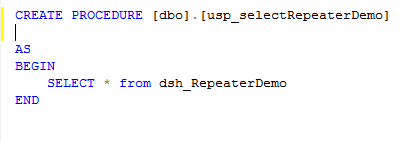
Here I am used Stored Procedure to Perform Insert, Edit, Update and delete Operation in Repeater control.

StoredProcedure For Insert data to database :


StoredProcedure For Read Data From Database table :

StoredProcedure For Update Data to Database table :


StoredProcedure For Delete Data Of Database Table :


Next Step To code In Default.aspx.cs page
Default.aspx.cs

using System;
using System.Collections.Generic;
using System.Linq;
using System.Web;
using System.Web.UI;
using System.Web.UI.WebControls;
using System.Data.SqlClient;
using System.Configuration;
using System.Data;
namespace RepeaterDemo
{
    public partial class _Default : System.Web.UI.Page
    {
        SqlConnection conn = new SqlConnection(ConfigurationManager.ConnectionStrings["RegistrationTable"].ConnectionString.ToString());
        static int userid;
        protected void Page_Load(object sender, EventArgs e)
        {
            if (!IsPostBack)
            {
                BindRepeater();
            }
        }
     
        //Save Button
        protected void btnsave_Click(object sender, EventArgs e)
        {
            //Code For Update Data
            if (btnsave.Text == "Update")
            {
                SqlCommand cmd = new SqlCommand();
                cmd.Connection = conn;
                cmd.Connection.Open();
                cmd.CommandText = "usp_updateRepeaterDemo";
                cmd.CommandType = CommandType.StoredProcedure;
                cmd.Parameters.AddWithValue("@name", txtname.Text);
                cmd.Parameters.AddWithValue("@username", txtusername.Text);
                cmd.Parameters.AddWithValue("@password", txtpass.Text);
                cmd.Parameters.AddWithValue("@id", userid);
                cmd.ExecuteNonQuery();
                conn.Close();
                clearcontrol();
                BindRepeater();
                btnsave.Text = "Save";
            }
            else
            {
                //Code For Inserting Data to Database Table
                SqlCommand cmd = new SqlCommand();
                cmd.Connection = conn;
                cmd.Connection.Open();
                cmd.CommandText = "usp_RepeaterDemo";
                cmd.CommandType = CommandType.StoredProcedure;
                cmd.Parameters.AddWithValue("@name", txtname.Text);
                cmd.Parameters.AddWithValue("@username", txtusername.Text);
                cmd.Parameters.AddWithValue("@password", txtpass.Text);
                clearcontrol();
                Response.Write("Record Inserted Successfully!");
                cmd.ExecuteNonQuery();
                conn.Close();
                BindRepeater();
            }
        }
        //Method For Bind Data To Repeater Control
        private void BindRepeater()
        {
            SqlCommand cmd = new SqlCommand();
            cmd.Connection = conn;
            cmd.Connection.Open();
            cmd.CommandText = "usp_selectRepeaterDemo";
            cmd.CommandType = CommandType.StoredProcedure;
            SqlDataAdapter adp = new SqlDataAdapter(cmd);
            DataTable dt = new DataTable();
            adp.Fill(dt);
            repeater.DataSource = dt;
            repeater.DataBind();
            conn.Close();
        }
        //Method for Clear Text From TextBoxes.
        private void clearcontrol()
        {
            txtname.Text = string.Empty;
            txtpass.Text = string.Empty;
            txtusername.Text = string.Empty;
        }
        protected void OnItemCommand_repeater(object source, RepeaterCommandEventArgs e)
        {
            //Code For Edit Record
            //On Commad Name Supplied to the Image Button-- "Edit" Button
            if (e.CommandName == "Edit")
            {
                //Getting Id of the selected record
                Label lblid1 = (Label)e.Item.FindControl("labelID");
                Label lblName = (Label)e.Item.FindControl("labelname");
                Label lblUsername = (Label)e.Item.FindControl("labelusername");
                Label lblPassword = (Label)e.Item.FindControl("labelpassword");
                userid = Convert.ToInt32(lblid1.Text);
                txtname.Text = lblName.Text;
                txtusername.Text = lblUsername.Text;
                txtpass.Text = lblPassword.Text;
                btnsave.Text = "Update";
            }
            //Code For Delete Record
            //On Commad Name Supplied to the Image Button-- "Delete" Button
            if (e.CommandName == "Delete")
            {
                ImageButton imgbtndelete = (ImageButton)e.Item.FindControl("imgdelete");
                //Getting Id of the selected record
                Label lblid1 = (Label)e.Item.FindControl("labelID");
                userid = Convert.ToInt32(lblid1.Text);
                SqlCommand cmd = new SqlCommand();
                cmd.Connection = conn;
                cmd.Connection.Open();
                cmd.CommandText = "usp_DeleteRepeaterRec";
                cmd.CommandType = CommandType.StoredProcedure;
                cmd.Parameters.AddWithValue("@id", userid);
                cmd.ExecuteNonQuery();
                conn.Close();
                BindRepeater();
                Response.Write("Record Deleted SuccessFully!");
            }
            //Code For Insert Record
            //On Commad Name Supplied to the Link Button-- "Insert" Button
            if (e.CommandName == "Insert")
            {
                TextBox txtUname = (TextBox)e.Item.FindControl("txtftrname");
                TextBox txtUusername = (TextBox)e.Item.FindControl("txtftrusername");
                TextBox txtUPassword = (TextBox)e.Item.FindControl("txtftrpassword");
                SqlCommand cmd = new SqlCommand();
                cmd.Connection = conn;
                cmd.Connection.Open();
                cmd.CommandText = "usp_RepeaterDemo";
                cmd.CommandType = CommandType.StoredProcedure;
                cmd.Parameters.AddWithValue("@name", txtUname.Text);
                cmd.Parameters.AddWithValue("@username", txtUusername.Text);
                cmd.Parameters.AddWithValue("@password", txtUPassword.Text);
                Response.Write("Record Inserted Successfully!");
                cmd.ExecuteNonQuery();
                cmd.Connection.Close();
                BindRepeater();
            }
        }
        //Cancel Button
        protected void btncancel_Click(object sender, EventArgs e)
        {
            //clear Text From Textboxes
            clearcontrol();
            btnsave.Text = "Save";
        }
    }
}
In above Code, BindRepeater() method is used to bind data into database and clearcontrol() method used to Clear Text From textboxes and ”OnItemCommand” for  Insert,Edit Delete Operation. 

OutPut:


Saturday, 1 March 2014

insert edit update delete using web service in asp .net C#

Hello Friends !!
Web services are Web-based applications accessed using the protocols of the web to be used by the web applications. It is basically a class consisting of method that could use by other applications. In simple word it is a part of web application that provides facility to communicate one system to another system through http (Hyper Text Transfer Protocol).

In this post I will explain insert ,edit ,update and delete operation through web service in asp.net c#.Now I have described how to insert,edit,update and delete operation with the help of web service and using with linq to sql.Complete step are given below.

1.Open Visual Studio
2.Create a new Project (ASP.NET Web Service) name it (WebServiceCrudOpe).
When open “ASP.NET Web Service”.By Default some code are prewritten in Service1.cs page as shown in below image.


Here I am using linq to sql for the CRUD Operation by web service.
For the crud operation ,first I create a table as shown in below figure.


Next step is to add a new item “LINQ to SQL Classes”.
See below figure after drag and drop table.


Now next step is create method for Insert,Edit,Update and Delete operation in Service1.asmx.cs page
Service1.asmx.cs

using System;
using System.Collections.Generic;
using System.Linq;
using System.Web;
using System.Web.Services;
using System.Data.Linq;
namespace WebServiceCrudOpe
{
    /// <summary>
    /// Summary description for Service1
    /// </summary>
    [WebService(Namespace = "http://tempuri.org/")]
    [WebServiceBinding(ConformsTo = WsiProfiles.BasicProfile1_1)]
    [System.ComponentModel.ToolboxItem(false)]
    // To allow this Web Service to be called from script, using ASP.NET AJAX, uncomment the following line.
    // [System.Web.Script.Services.ScriptService]
    public class Service1 : System.Web.Services.WebService
    {
        DataClasses1DataContext db = new DataClasses1DataContext();
        [WebMethod]
        public string HelloWorld()
        {
            return "Hello World";
        }
        //Method for Insertind data into database
        [WebMethod]
        public dsh_webserviceCRUD InserData(dsh_webserviceCRUD obj)
        {
            dsh_webserviceCRUD webobj = new dsh_webserviceCRUD();
            webobj.Name = obj.Name;
            webobj.Address = obj.Address;
            webobj.ContactNo = obj.ContactNo;
            db.dsh_webserviceCRUDs.InsertOnSubmit(webobj);
            db.SubmitChanges();
            return webobj;
        }
        //Method for Read/Get data from database
        [WebMethod]
        public List<dsh_webserviceCRUD> ReadData()
        {
            List<dsh_webserviceCRUD> listdata = new List<dsh_webserviceCRUD>();
            listdata = (from o in db.dsh_webserviceCRUDs
                        select o).ToList();
            return listdata;
        }
        //Method for Get Specif ID from database
        [WebMethod]
        public List<dsh_webserviceCRUD> ReadSpecific(int id)
        {
            List<dsh_webserviceCRUD> listspecific = new List<dsh_webserviceCRUD>();
            listspecific = db.dsh_webserviceCRUDs.Where(o => o.Id == id).ToList();
            return listspecific;
        }
        //Method for Updating data of database
        [WebMethod]
        public dsh_webserviceCRUD UpdateRec(dsh_webserviceCRUD obj)
        {
            dsh_webserviceCRUD updatedata = new dsh_webserviceCRUD();
            updatedata = db.dsh_webserviceCRUDs.Where(o => o.Id == obj.Id).FirstOrDefault();
            updatedata.Name = obj.Name;
            updatedata.Address = obj.Address;
            updatedata.ContactNo = obj.ContactNo;

            db.SubmitChanges();
            return updatedata;
        }
        //Method for Deleting data of database
        [WebMethod]
        public dsh_webserviceCRUD DeleteRec(int id)
        {
            dsh_webserviceCRUD DelRec = new dsh_webserviceCRUD();
            DelRec = db.dsh_webserviceCRUDs.Where(o => o.Id.Equals(id)).FirstOrDefault();
            db.dsh_webserviceCRUDs.DeleteOnSubmit(DelRec);
            db.SubmitChanges();
            return DelRec;
        }
    }
}
Here “[WebMethod]” is responsible to execute code on web.
Now Run the Web Service .


After run webservice you get URL (http://localhost:58126/Service1.asmx) that shown in above figure.
Copy the URL for the further use.

Now Move to Make a client side Project for the use of Web Service.
3 .Open Visual Studio
4. Create a new Project (ASP.NET Web Application) name it (WebserviceCRUD).
After that I have design  Default.aspx page with three textbox ,one button and one GridView for CRUD operation.
Default.aspx

<%@ Page Language="C#" AutoEventWireup="true" CodeBehind="Default.aspx.cs" Inherits="WebserviceCRUD._Default" %>
<!DOCTYPE html PUBLIC "-//W3C//DTD XHTML 1.0 Transitional//EN" "http://www.w3.org/TR/xhtml1/DTD/xhtml1-transitional.dtd">
<html xmlns="http://www.w3.org/1999/xhtml">
<head runat="server">
    <title></title>
    <style type="text/css">
        .style1
        {
            width: 100%;
        }
        .style3
        {
            height: 41px;
        }
        .style4
        {
            height: 41px;
        }
        .style5
        {
            width: 38px;
            height: 41px;
        }
    </style>
</head>
<body>
    <form id="form1" runat="server">
    <div style="height: 223px; width: 889px">
        <br />
        <table class="style1">
            <tr>
                <td class="style5">
                    Name:
                </td>
                <td class="style4">
                    <asp:TextBox ID="TextBox1" runat="server" Height="20px"></asp:TextBox>
                </td>
            </tr>
            <tr>
                <td class="style5">
                    Address:
                </td>
                <td class="style4">
                    <asp:TextBox ID="TextBox2" runat="server"></asp:TextBox>
                </td>
            </tr>
            <tr>
                <td class="style5">
                    ContactNo:
                </td>
                <td class="style4">
                    <asp:TextBox ID="TextBox3" runat="server"></asp:TextBox>
                </td>
            </tr>
            <tr>
                <td class="style3" colspan="2">
                 <asp:Button ID="Button1" runat="server" Text="Submit" OnClick="Button1_Click" Height="33px"
                        Width="76px" />
        <asp:Label ID="Label1" runat="server" Text="Label" Visible="False"></asp:Label>
                </td>
            </tr>
        </table>
        <br />
        <br />
       
    </div>
    <asp:GridView ID="GridView1" runat="server" AutoGenerateColumns="false" OnRowCommand="GridView1_RowCommand"
        DataKeyNames="Id" OnRowEditing="GridView1_RowEditing" OnRowDeleting="GridView1_RowDeleting">
        <Columns>
            <asp:TemplateField HeaderText="Name">
                <ItemTemplate>
                    <asp:Label ID="lblname" runat="server" Text='<%#Eval("Name") %>'></asp:Label>
                </ItemTemplate>
            </asp:TemplateField>
            <asp:TemplateField HeaderText="Address">
                <ItemTemplate>
                    <asp:Label ID="lbladdress" runat="server" Text='<%#Eval("Address") %>'></asp:Label>
                </ItemTemplate>
            </asp:TemplateField>
            <asp:TemplateField HeaderText="ContactNO">
                <ItemTemplate>
                    <asp:Label ID="lblcontactno" runat="server" Text='<%#Eval("ContactNo") %>'> </asp:Label>
                </ItemTemplate>
            </asp:TemplateField>
            <asp:TemplateField HeaderText="Edit">
                <ItemTemplate>
                    <asp:ImageButton ID="editbtn" runat="server" Height="40px" ImageUrl="~/img/edit-128.png"
                        Width="44px" CommandName="edit" />
                </ItemTemplate>
            </asp:TemplateField>
            <asp:TemplateField HeaderText="Delete">
                <ItemTemplate>
                    <asp:ImageButton ID="deletebtn" runat="server" ImageUrl="img/delete-24.png" Height="42px"
                        Width="39px" CommandName="delete" />
                </ItemTemplate>
            </asp:TemplateField>
        </Columns>
    </asp:GridView>
    </form>
</body>
</html>
Next step to add web service reference in project. Right click on project and select “Add Web Reference” as shown in below figure.


After select “Add Web Reference” you will get a window . In “Add Web Reference”window ,paste  URL (Which I copy in above scenario) within URL Textbox.Then Click on Go button,and see all available Web Service Method will appear on pane below.
Note give the specific “Web reference name “.I am using “localhost1”.


After click on “Add Reference” button, you can see  solution explorer, you will find “localhost1” is added in solution as shown in below figure.


After open  Default.aspx.cs and write following code.
Default.aspx.cs

using System;
using System.Collections.Generic;
using System.Linq;
using System.Web;
using System.Web.UI;
using System.Web.UI.WebControls;
using WebserviceCRUD.localhost1;
using System.Data.Linq;
namespace WebserviceCRUD
{
    public partial class _Default : System.Web.UI.Page
    {
        localhost1.Service1 svobj = new Service1();
        static int pk_id;
        protected void Page_Load(object sender, EventArgs e)
        {
            if (!IsPostBack)
            {
                GrdBind();
            }
        }
        private void GrdBind()
        {
            List<dsh_webserviceCRUD> listdata1 = svobj.ReadData().ToList();
            GridView1.DataSource = listdata1;
            GridView1.DataBind();
        }
        protected void Button1_Click(object sender, EventArgs e)
        {
            if (Button1.Text == "Submit")
            {
                dsh_webserviceCRUD data = svobj.InserData(GetControlData());
                if (data != null)
                {
                    Label1.Text = data.Name + "Record" + " " + "Submited Succesfully";
                    Label1.Visible = true;
                    GrdBind();
                    ClearControl();
                }
            }
            else if (Button1.Text == "Update")
            {
                dsh_webserviceCRUD data1 = svobj.UpdateRec(GetControlData());
                Button1.Text = "Submit";
                GrdBind();
                ClearControl();
                Label1.Text = data1.Name + "" + "Record Updated Successfully";
                Label1.Visible = true;
            }
        }
        private void ClearControl()
        {
            TextBox1.Text = string.Empty;
            TextBox2.Text = string.Empty;
            TextBox3.Text = string.Empty;
        }
        private dsh_webserviceCRUD GetControlData()
        {
            dsh_webserviceCRUD cntrlobj = new dsh_webserviceCRUD();
            cntrlobj.Name = TextBox1.Text;
            cntrlobj.Address = TextBox2.Text;
            cntrlobj.ContactNo = TextBox3.Text;
            cntrlobj.Id = pk_id;
            return cntrlobj;
        }
        protected void GridView1_RowCommand(object sender, GridViewCommandEventArgs e)
        {
            GridViewRow index = (GridViewRow)((ImageButton)e.CommandSource).NamingContainer;
            pk_id = Convert.ToInt32(GridView1.DataKeys[index.RowIndex].Value);
            if (e.CommandName == "edit")
            {
                List<dsh_webserviceCRUD> data = svobj.ReadSpecific(pk_id).ToList();
                TextBox1.Text = data.ToList()[0].Name;
                TextBox2.Text = data.ToList()[0].Address;
                TextBox3.Text = data.ToList()[0].ContactNo;
                Button1.Text = "Update";
                Label1.Visible = false;
            }
            else if (e.CommandName == "delete")
            {
                dsh_webserviceCRUD dlrec = svobj.DeleteRec(pk_id);
                Label1.Text = dlrec.Name + "  " + "Record Deleted Successfully";
                Label1.Visible = true;
                GrdBind();
            }
        }
        protected void GridView1_RowEditing(object sender, GridViewEditEventArgs e)
        {
        }
        protected void GridView1_RowDeleting(object sender, GridViewDeleteEventArgs e)
        {
        }
    }
}
Run the application and see the output as below.


Thursday, 27 February 2014

Insert Edit Update Delete using wcf service in asp.net c#

Hello Friends !!
In this Post I will Explain WCF Service (Window Communication Foundation) in Asp .net c#.
In this post I will show you how to create WCF Service and how to consume it within an aspx page to perform CRUD operation using  WCF Service.For the CRUD (Create,Read,Update,Delete) operation using WCF service in asp with C#, I have use the one Stored procedure using in linq to sql.

First I have created one table in database :-


After creating table I have make one stored procedure with multiple queries when I execute this stored procedure using linq to sql it will give different result on condition to perform CRUD operation.
Here I am using also Resource file for set condition on stored procedure.
In the below stored procedure you can see parameter @Dboperation that condition value set by resource file.

CREATE PROCEDURE [dbo].[usp_WCF_CRUD]
@Dboperation varchar(50),
@empid int,
@name nvarchar(50),
@department nvarchar(50),
@desigination nvarchar(50),
@salary nvarchar(50),
@address nvarchar(50),
@contactno nvarchar(50),
AS
BEGIN
begin try
if(@Dboperation='ReadAll')
begin
select * from dsh_WCF_CRUD
end
else if(@Dboperation='ReadSpecific')
begin
select * from dsh_WCF_CRUD where empid=@empid
end
else if(@Dboperation='Create')
begin
INSERT INTO [Demo].[dbo].[dsh_WCF_CRUD]
           ([name],[department],[desigination],[salary],[address],[contactno])
VALUES
           (@name,@department,@desigination,@salary,@address,@contactno)
select * from dsh_WCF_CRUD where empid=scope_identity();
end
else if(@Dboperation='Update')
begin
UPDATE [Demo].[dbo].[dsh_WCF_CRUD]
    SET [name] = @name,
      [department] = @department,
     [desigination] = @desigination,
      [salary] =@salary,
      [address] = @address,
      [contactno] =@contactno
    WHERE empid=@empid
end
else if(@Dboperation='Delete')
begin
DELETE FROM [Demo].[dbo].[dsh_WCF_CRUD]
    WHERE empid=@empid
end
end try
begin catch
end catch
END
After Creating Stored Procedure 
1 Open Visual Studio 
2 Create a new Project (ASP.NET Web Application) name it (DataEntity)
3  Next step is to add a new item “LINQ to SQL Classes”.
   See figure below after drag and drop stored procedure.


After that ,
4 Add New Project (ASP.NET Web Application)  name it(ReasourceFile)
5 next step is to add a new item “Resources File”. Name it(Dboperation.resx).
Add the following value in resource file  in from the below figure.
This resource file use for database operation to set value into stored procedure.


Then after
6 Add New Project  (WCF Service Application) name it (WCF-CRUD)
Once you created project you will get default class files including Service.cs and IService.cs. But I am adding one new wcf service. 
7 next step is to add a new item “WCF Service”. Name it (empservice.svc).
After adding all this ,the whole solution look like in the below figure.


Now open Iempservice.cs and write following code.
Iempservice.cs

using System;
using System.Collections.Generic;
using System.Linq;
using System.Runtime.Serialization;
using System.ServiceModel;
using System.Text;
using DataEntity;
namespace WCF_CRUD
{
    // NOTE: If you change the interface name "Iempservice" here, you must also update the reference to "Iempservice" in Web.config.
    [ServiceContract]
    public interface Iempservice
    {
        [OperationContract]
        void DoWork();
        [OperationContract]
        List<usp_WCF_CRUDResult> InsertEmployee(usp_WCF_CRUDResult empobj);
        [OperationContract]
        List<usp_WCF_CRUDResult> ReadAllEmployee();
        [OperationContract]
        List<usp_WCF_CRUDResult> ReadSpecific(int ID);
        [OperationContract]
        List<usp_WCF_CRUDResult> UpdateEmployee(usp_WCF_CRUDResult updateemp);
        [OperationContract]
        List<usp_WCF_CRUDResult> DeleteEmployee(int ID);
    }
}
After that open empservice.cs and write the following code.
empservice.cs

using System;
using System.Collections.Generic;
using System.Linq;
using System.Runtime.Serialization;
using System.ServiceModel;
using System.Text;
using DataEntity;
using System.Data.Linq;
using System.Data.SqlClient;
using ReasourceFile;

namespace WCF_CRUD
{
    // NOTE: If you change the class name "empservice" here, you must also update the reference to "empservice" in Web.config.
    public class empservice : Iempservice
    {
        DataClasses1DataContext db = new DataClasses1DataContext();
        public void DoWork()
        {
        }
        #region Iempservice Members
        List<usp_WCF_CRUDResult> Iempservice.InsertEmployee(usp_WCF_CRUDResult empobj)
        {
            List<DataEntity.usp_WCF_CRUDResult> empdata = new List<DataEntity.usp_WCF_CRUDResult>();
         
                using (DataClasses1DataContext db = new DataClasses1DataContext())
                {
                    empdata = db.usp_WCF_CRUD(Dboperation.CreateRecord, null, empobj.name, empobj.department, empobj.desigination, empobj.salary, empobj.address, empobj.contactno, null).ToList();
                }
               
            return empdata;
        }
        #endregion
        #region Iempservice Members

        public List<usp_WCF_CRUDResult> ReadAllEmployee()
        {
            List<usp_WCF_CRUDResult> EmplList = new List<usp_WCF_CRUDResult>();
         
                using (DataClasses1DataContext db = new DataClasses1DataContext())
                {
                    EmplList = db.usp_WCF_CRUD(Dboperation.ReadAllRecord, null, null, null, null, null, null, null, null).ToList();
                }
         
         
            return EmplList;
        }
        #endregion
        #region Iempservice Members
        #endregion
        #region Iempservice Members

        public List<usp_WCF_CRUDResult> ReadSpecific(int ID)
        {
            List<usp_WCF_CRUDResult> empobj = new List<usp_WCF_CRUDResult>();
            using (DataClasses1DataContext db = new DataClasses1DataContext())
            {
                empobj = db.usp_WCF_CRUD(Dboperation.ReadSpecificRecord, ID, null, null, null, null, null, null, null).ToList();
            }
            return empobj;
        }
        #endregion
        #region Iempservice Members

        public List<usp_WCF_CRUDResult> UpdateEmployee(usp_WCF_CRUDResult updateemp)
        {
            List<usp_WCF_CRUDResult> empobj = new List<usp_WCF_CRUDResult>();
            using (DataClasses1DataContext db = new DataClasses1DataContext())
            {
                empobj = db.usp_WCF_CRUD(Dboperation.UpdateRecord,updateemp.empid,updateemp.name,updateemp.department,updateemp.desigination,updateemp.salary,updateemp.address,updateemp.contactno,null).ToList();
            }
            return empobj;
        }
        #endregion
        #region Iempservice Members

        public List<usp_WCF_CRUDResult> DeleteEmployee(int ID)
        {
            List<usp_WCF_CRUDResult> deleteemp = new List<usp_WCF_CRUDResult>();
            using (DataClasses1DataContext db = new DataClasses1DataContext())
            {
                deleteemp = db.usp_WCF_CRUD(Dboperation.DeleteRecord, ID, null, null, null, null, null, null, null).ToList();
            }
            return deleteemp;
        }
        #endregion
    }
}
Now copy connection string from DataEntity config file to WCF-CRUD config file.
See below figure.


After that Add Client side Project.
8 Add New Project (ASP.NET Web Application)  name it(ClientApp)
After adding project the whole solution look like below figure.


After that open ClienApp Project and open Default.aspx and design Default.aspx as I done in following code.
Default.aspx

<%@ Page Language="C#" AutoEventWireup="true" CodeBehind="Default.aspx.cs" Inherits="ClientApp._Default" %>
<!DOCTYPE html PUBLIC "-//W3C//DTD XHTML 1.0 Transitional//EN" "http://www.w3.org/TR/xhtml1/DTD/xhtml1-transitional.dtd">
<html xmlns="http://www.w3.org/1999/xhtml">
<head runat="server">
    <title></title>
    <style type="text/css">
        .style1
        {
            width: 100%;
        }
        .style2
        {
        }
        .style3
        {
            width: 94px;
        }
    </style>
</head>
<body>
    <form id="form1" runat="server">
    <div>
        <table class="style1">
            <tr>
                <td colspan="2">
                    Register
                </td>
            </tr>
            <tr>
                <td class="style3">
                    EmployeeName:
                </td>
                <td>
                    <asp:TextBox ID="TextBox1" runat="server"></asp:TextBox>
                </td>
            </tr>
            <tr>
                <td class="style3">
                    Desigination:
                </td>
                <td>
                    <asp:TextBox ID="TextBox2" runat="server"></asp:TextBox>
                </td>
            </tr>
            <tr>
                <td class="style3">
                    Department:
                </td>
                <td>
                    <asp:TextBox ID="TextBox3" runat="server"></asp:TextBox>
                </td>
            </tr>
            <tr>
                <td class="style3">
                    Salary:
                </td>
                <td>
                    <asp:TextBox ID="TextBox4" runat="server"></asp:TextBox>
                </td>
            </tr>
            <tr>
                <td class="style3">
                    Address:
                </td>
                <td>
                    <asp:TextBox ID="TextBox5" runat="server"></asp:TextBox>
                </td>
            </tr>
            <tr>
                <td class="style3">
                    ContactNo:
                </td>
                <td>
                    <asp:TextBox ID="TextBox6" runat="server"></asp:TextBox>
                </td>
            </tr>
            <tr>
                <td class="style2" colspan="2">
                    <asp:Button ID="Button1" runat="server" OnClick="Button1_Click" Text="Button" />
                    &nbsp;
                    <asp:Label ID="Label1" runat="server" ForeColor="Red" Text="Data is not available"
                        Visible="False"></asp:Label>
                </td>
            </tr>
        </table>
    </div>
    <asp:GridView ID="GridView1" runat="server" AutoGenerateColumns="False" BackColor="White"
        BorderColor="#3366CC" BorderStyle="None" BorderWidth="1px" CellPadding="4" OnRowCommand="GridView1_RowCommand"
        DataKeyNames="empid" OnRowDeleting="GridView1_RowDeleting" OnRowEditing="GridView1_RowEditing">
        <RowStyle BackColor="White" ForeColor="#003399" />
        <Columns>
            <asp:TemplateField HeaderText="EmpId" Visible="false">
                <ItemTemplate>
                    <asp:Label ID="lblempid" runat="server" Text='<%#Eval("empid") %>'></asp:Label>
                </ItemTemplate>
            </asp:TemplateField>
            <asp:TemplateField HeaderText="EmpName">
                <ItemTemplate>
                    <asp:Label ID="lblname" runat="server" Text='<%#Eval("name") %>'></asp:Label>
                </ItemTemplate>
            </asp:TemplateField>
            <asp:TemplateField HeaderText="Department">
                <ItemTemplate>
                    <asp:Label ID="lbldepartment" runat="server" Text='<%#Eval("department") %>'></asp:Label>
                </ItemTemplate>
            </asp:TemplateField>
            <asp:TemplateField HeaderText="Desigination">
                <ItemTemplate>
                    <asp:Label ID="lbldesigination" runat="server" Text='<%#Eval("desigination") %>'></asp:Label>
                </ItemTemplate>
            </asp:TemplateField>
            <asp:TemplateField HeaderText="salary">
                <ItemTemplate>
                    <asp:Label ID="lblsalary" runat="server" Text='<%#Eval("salary") %>'></asp:Label>
                </ItemTemplate>
            </asp:TemplateField>
            <asp:TemplateField HeaderText="Address">
                <ItemTemplate>
                    <asp:Label ID="lbladdress" runat="server" Text='<%#Eval("address") %>'></asp:Label>
                </ItemTemplate>
            </asp:TemplateField>
            <asp:TemplateField HeaderText="ContactNo">
                <ItemTemplate>
                    <asp:Label ID="lblcontactno" runat="server" Text='<%#Eval("contactno") %>'></asp:Label>
                </ItemTemplate>
            </asp:TemplateField>
            <asp:TemplateField HeaderText="Edit">
                <ItemTemplate>
                    <asp:ImageButton ID="EditImage" runat="server" CommandName="Edit" ImageUrl="img/editimage.jpg"
                        Height="33px" Width="36px" />
                </ItemTemplate>
            </asp:TemplateField>
            <asp:TemplateField HeaderText="Delete">
                <ItemTemplate>
                    <asp:ImageButton ID="ImageButton1" runat="server" Height="31px" CommandName="Delete"
                        ImageUrl="~/img/images (1).jpg" Width="36px" />
                </ItemTemplate>
            </asp:TemplateField>
        </Columns>
        <FooterStyle BackColor="#99CCCC" ForeColor="#003399" />
        <PagerStyle BackColor="#99CCCC" ForeColor="#003399" HorizontalAlign="Left" />
        <SelectedRowStyle BackColor="#009999" Font-Bold="True" ForeColor="#CCFF99" />
        <HeaderStyle BackColor="#003399" Font-Bold="True" ForeColor="#CCCCFF" />
    </asp:GridView>
    </form>
</body>
</html>
Default.aspx look like below figure.


After that move to WCF-CUD project and run empservice.svc .


after run service you get web service url (http://localhost:49994/empservice.svc) that show in below figure.


Now move to ClienApp project ,right click on project and select  “Add Service Reference” from context menu.


After enter your service url and click on GO button to see a list of available services and all the available web method (service method) will appear on the pane below.
Note give the specific reference name. I am using default service reference namespace as “ServiceReference1”.


Now observ the solution explorer, you will find ServiceReference1 is added in solution.


After open  Default.aspx.cs and write following code.
Default.aspx.cs

using System;
using System.Collections.Generic;
using System.Linq;
using System.Web;
using System.Web.UI;
using System.Web.UI.WebControls;
using System.ServiceModel;
using System.Data.Linq;
using DataEntity;
using ReasourceFile;
using WCF_CRUD;
using ClientApp.ServiceReference1;
namespace ClientApp
{
    public partial class _Default : System.Web.UI.Page
    {
        static int PK_id;
        ServiceReference1.IempserviceClient ss1 = new ServiceReference1.IempserviceClient();
        protected void Page_Load(object sender, EventArgs e)
        {
            if (!IsPostBack)
            {
                BindGrid();
            }
        }
        private void BindGrid()
        {
            List<usp_WCF_CRUDResult> empdata = ss1.ReadAllEmployee();
            GridView1.DataSource = empdata;
            GridView1.DataBind();
        }
        protected void Button1_Click(object sender, EventArgs e)
        {
            if (Button1.Text == "Update")
            {
                List<usp_WCF_CRUDResult> emplist1 = ss1.UpdateEmployee(GetControlData());
            }
            else
            {
                List<usp_WCF_CRUDResult> emplist = ss1.InsertEmployee(GetControlData());
            }
            BindGrid();
            ClearControl();
        }
        private void ClearControl()
        {
            TextBox1.Text = string.Empty;
            TextBox2.Text = string.Empty;
            TextBox3.Text = string.Empty;
            TextBox4.Text = string.Empty;
            TextBox5.Text = string.Empty;
            TextBox6.Text = string.Empty;
        }
        private usp_WCF_CRUDResult GetControlData()
        {
            usp_WCF_CRUDResult uspobj = new usp_WCF_CRUDResult()
            {
                name = TextBox1.Text,
                department = TextBox2.Text,
                desigination = TextBox3.Text,
                salary = TextBox4.Text,
                address = TextBox5.Text,
                contactno = TextBox6.Text,
                empid = PK_id
            };
            return uspobj;
        }
        protected void GridView1_RowCommand(object sender, GridViewCommandEventArgs e)
        {
            if (GridView1.Rows.Count == 0)
            {
                Label1.Visible = true;
            }
            else
            {
                if (e.CommandName == "Edit")
                {
                    GridViewRow index = (GridViewRow)((ImageButton)e.CommandSource).NamingContainer;
                    PK_id = Convert.ToInt32(GridView1.DataKeys[index.RowIndex].Value);
                    List<usp_WCF_CRUDResult> emplist = ss1.ReadSpecific(PK_id);
                    TextBox1.Text = emplist[0].name;
                    TextBox2.Text = emplist[0].department;
                    TextBox3.Text = emplist[0].desigination;
                    TextBox4.Text = emplist[0].salary;
                    TextBox5.Text = emplist[0].address;
                    TextBox6.Text = emplist[0].contactno;
                    Button1.Text = "Update";
                }
                else if (e.CommandName == "Delete")
                {
                    GridViewRow index = (GridViewRow)((ImageButton)e.CommandSource).NamingContainer;
                    PK_id = Convert.ToInt32(GridView1.DataKeys[index.RowIndex].Value);
                    List<usp_WCF_CRUDResult> deleteemp = ss1.DeleteEmployee(PK_id);
                    BindGrid();
                }
            }
        }
        protected void GridView1_RowEditing(object sender, GridViewEditEventArgs e)
        {
        }
        protected void GridView1_RowDeleting(object sender, GridViewDeleteEventArgs e)
        {
        }
    }
}
Run the application and see the output as below.


Popular Posts

Recent Posts

Sample Text

Stats

Powered by Blogger.

Popular Posts

Popular Posts

Join US on Facebook